
Contents
- Reporting cadence
- Who does what?
- How do I pull the report?
- When things go wrong
- How Claude works (the non-technical version)
Why we're doing this
Reporting has always been one of the most time-and-labor-intensive parts of client delivery at Vye. Writing insights, pulling channel data, formatting deliverables, and tailoring each report to each client's goals took hours — and quality varied depending on who was doing it and how much time they had.
We built an AI-powered reporting workflow to alleviate the burden of manual data pulls, allowing us to focus on insights and true value. This means:
-
Speed without sacrificing quality. Claude drafts structured, insight-driven reports in a fraction of the time, freeing up DMS and AM bandwidth for higher-value work.
-
Consistency across clients. Every report follows the same logic and standards, regardless of who runs it.
-
Smarter insights. The AI synthesizes data across channels and surfaces patterns that might get missed in a manual pull.
-
Scalability. As our client roster grows, we can't afford to grow reporting hours at the same rate. This is how we scale without scaling headcount.
The goal is for every client to feel like they have a dedicated analyst on their account — because now they do.
High-Level Overview
The AI-powered reporting process runs inside Claude. Each client has a dedicated Claude skill that holds their reporting configuration, historical context, and any client-specific quirks.
When it's time to run a report, the team member triggers the process inside the client's project. Claude then:
- Pulls the client's reporting config automatically (data sources, deliverable format, required comparisons, methodology caveats)
- Asks for the data it needs — the team member pastes or uploads it (guided by Claude step-by-step)
- Drafts the full report: channel-by-channel performance, insights, and recommendations
- Prompts the team member to add context Claude can't know (call notes, campaign context and updates, what the client said recently)
- Produces a first draft deliverable in the right format for that client
- Collaborates with the Vye team member to refine formatting, insight, and recommendations to produce a truly valuable report in a fraction of the time.
Want to know more about how reports are set up for our clients?
Check out this article: "Setting Up New Clients with AI Reporting".
The team member is not replaced — they are the expert in the room taking on a more strategic editorial role while Claude handles the structure, drafting, and synthesis.
Reporting Cadence
We're moving away from treating monthly and quarterly reporting as separate, parallel tracks. Going forward, we operate with one philosophy: We are always working toward a quarterly view. Monthly and mid-quarter updates are checkpoints along the way — not standalone deliverables with their own separate logic.
This does not mean month-over-month insights are lost or omitted. What this means in practice:
-
Monthly updates feed into and contextualize the quarter — they're not just snapshots of last month. This allows us to identify KPIs that are trending on or off pace and act quickly and efficiently.
-
Every month, we're updating the client's quarter-to-date KPI progress, not just reporting on what happened in the prior period.
-
By the time a quarter closes, the executive report should be largely written — not starting from scratch.
-
This eliminates the crunch of "monthly reporting season" followed immediately by "quarterly reporting season."
The cadence varies by client. What's consistent is the orientation: every update points toward the quarter.
Who does what?
Reporting responsibilities are split by client tier.
| Role | Enterprise and accelerator clients |
All other tiers |
|---|---|---|
|
Account Manager |
Reviews the report deliverable, requests edits, packaged to client | Uses the Claude skill to pull and finalize the report deliverable |
|
Strategist |
Uses the Claude skill to pull and finalize the report deliverable | Supports as needed with strategic recommendations and data anlaysis |
|
Architect |
Builds and updates reporting architecture and reporting configuration | |
|
AI/Tech Team |
Loads updated config docs into Claude/assists with troubleshooting as needed | |
How do I pull the report?
Pulling the report lives inside your client's Claude Project on claude.ai. Here's the basic flow:
- Open the client's Claude Project
- Start a new conversation and ask it to pull the report
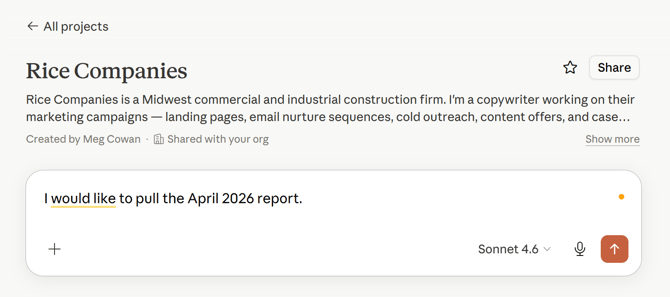
- Claude will load the client's reporting config and tell you exactly what data it needs and confirm any details
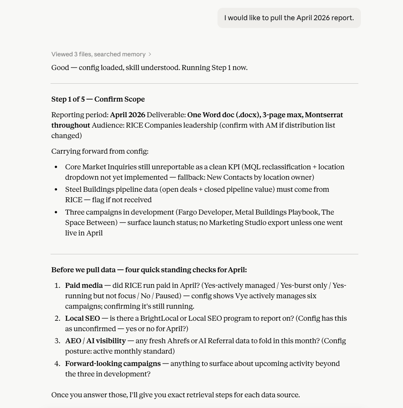
- Paste or upload the requested data — Claude will walk you through it source by source
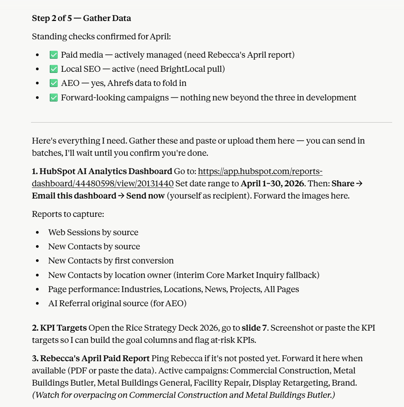
- Add context when prompted: call notes, campaign details, anything from recent client conversations
- Review Claude's draft, make edits, and flag anything that needs additional input
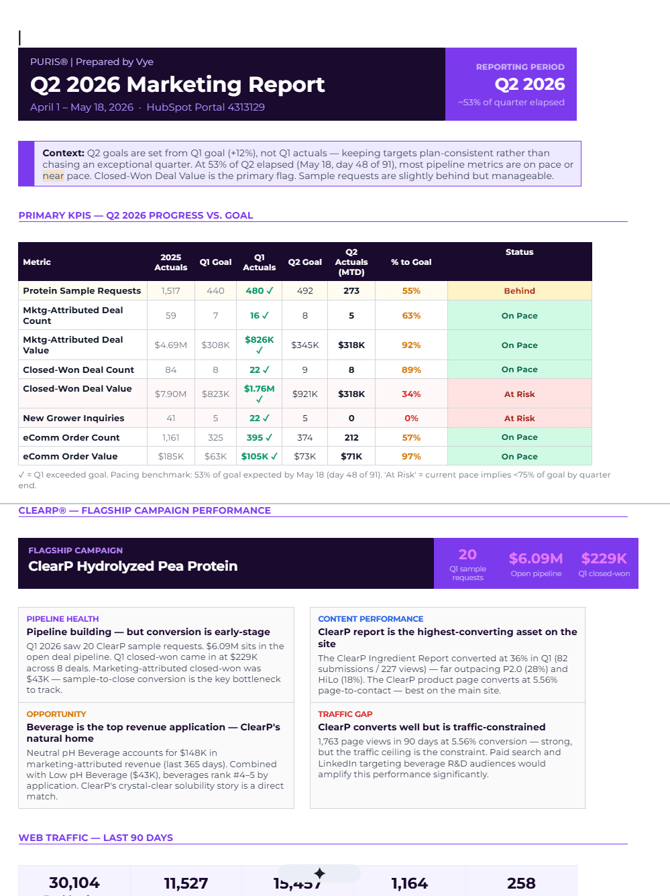
- AM reviews and signs off before it goes to the client
When things go wrong
The AI reporting process is new, and things will occasionally break or behave unexpectedly - or we simply may need to make configuration refinements or additions. No worries! Here's how to handle common issues.
| Issue | What to Do |
|---|---|
| Claude produces an incomplete or clearly wrong draft |
Add context, re-run the relevant section, or manually adjust. |
| A data source isn't pulling correctly or access is broken | Pull the data manually for this cycle if possible and submit a ticket. |
| The reporting config for a client is missing or out of date | Submit a ticket |
How to Submit an AI Reporting Ticket:
- Access the Request form here: >>LINK<<
- Complete the form and provide as much detail as possible regarding the issue or request.
You will receive a confirmation email that your request has been confirmed and when progress has begun.
👀A look behind the scenes: Once your ticket is submitted, Teamwork task, and HubSpot ticket are immediately assigned to Gracie. Gracie then reviews the request, collects additional information and routes the ticket and re-assigns the task to the correct teammate for work to be completed. You will be given the chance to review/test revisions made before the ticket is closed/completed.
How Claude works (the non-technical version)
You don't need to be an AI expert to use this workflow. But understanding a few basics will help you get better output and troubleshoot when something feels off.
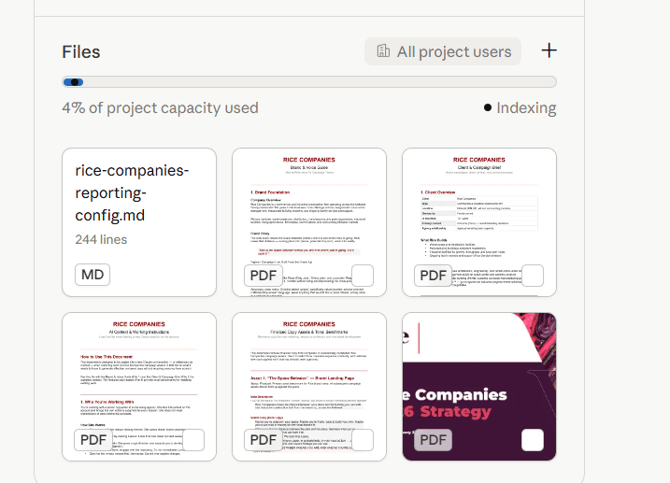
Claude is context-dependent. Claude doesn't have memory between sessions. Every time you open a report, it starts fresh — which is why the client's Claude Project exists. The Project stores the reporting config and client context so Claude always knows what kind of client it's working with. Always work inside the right client's Project. Running a report outside the Project, or in the wrong one, means Claude won't have the config and will produce generic output.
Becuase Claude will rely on the files saved to the client's project, it is VERY IMPORTANT that these files are the most up-to-date versions. Otherwise, Clause may get confused and pulloutdated KPI targets or context.
See something outdated? Submit an AI reporting ticket ASAP.
Claude is a collaborator, not an oracle. Claude is very good at structure, synthesis, and drafting. It is not good at knowing what happened on your last status call, what the client's CEO cares about this quarter, or why a campaign underperformed. That's your job. The process is designed around this: Claude asks you for context at the right moments. Give it real context — not just data — and the output will be significantly stronger.
The reporting config is the source of truth. Every client project has a reporting config file. This tells Claude how to report on that client: which data sources to ask for, what format the deliverable takes, what comparisons to make, and any known methodology quirks. If the config is wrong or missing, Claude will make its best guess — and that guess will probably miss the mark. If you notice the config is out of date, flag it and submit a ticket.
LIFE HACK ALERT 😉
Need to create a task based on that you found in the report? Ask Claude in your reporting chat to make one!
Tips for better output:
- Paste data cleanly and visibly — exported tables work well; messy copy-paste from dashboards can confuse Claude.
- Be specific when adding context ("the client mentioned they're expecting a board meeting next month" is more useful than "the client is important")
- If a section comes back weak, ask Claude to redo it: "This insight doesn't explain why it happened — add the context I gave you about the LinkedIn campaign"
- Pro Tip: Asking Claude to regenerate the report every time can eat up your afternoon. Instead, try asking Claude for more insight on particular sections and copying those into your working draft.
- Don't edit Claude's draft in the chat and then re-ask Claude about it — Claude won't see your edits; give new instructions instead
A note on accuracy: Claude can make mistakes. It can misinterpret data, miss a nuance, or confidently write something that isn't quite right. Your review step is not optional — it is the quality gate between Claude's draft and your client's inbox. The AI saves you time on structure and synthesis. You are still accountable for what goes out.