
What Is a Campaign?
Before we talk about HubSpot, let's align on what a campaign actually means at Vye.
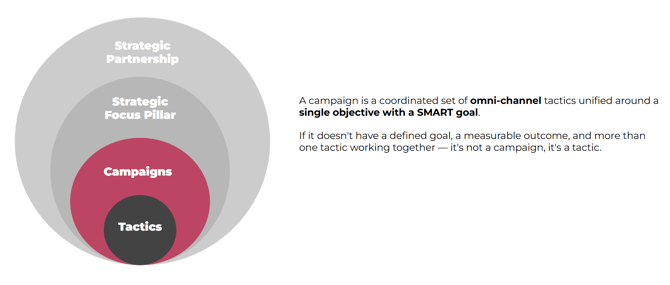
A campaign is a coordinated set of omni-channel tactics unified around a single objective with a SMART goal.
If it doesn't have a defined goal, a measurable outcome, and more than one tactic working together — it's not a campaign, it's a tactic.
Campaigns live within our broader strategy hierarchy:
Strategic Partnership → Strategic Focus Pillar → Campaigns → Tactics
This matters because it shapes how we set up campaigns in HubSpot. A campaign in HubSpot should always map to something intentional in our strategy — not be created on the fly to organize assets.
Confused about "tactics" vs "assets"?
A tactic is the what you're doing — the channel or method you're deploying as part of a campaign. Email nurture, paid search, social media. It's a strategic choice that has a role in moving someone through the funnel.
An asset is the thing you make to execute the tactic. The email itself, the landing page, the ad creative, the slide deck. Assets live inside tactics.
So a tactic without an asset is just a plan.
An asset without a tactic is just a deliverable. Together they're execution.
What Is a HubSpot Campaign?
A HubSpot Campaign is the tool we use to connect strategy to execution and measurement inside the CRM. It's not a folder. It's not just a label. When you associate an asset with a HubSpot campaign, you are stamping that asset with attribution data that cannot be undone.
That distinction matters more than most people realize.
Why HubSpot Campaigns Matter
HubSpot campaigns are one of the most powerful — and most misunderstood — features in the platform. Here's why we treat them seriously:
1. They stamp irreversible attribution properties. When a contact interacts with a campaign-associated asset (a form, a landing page, a CTA), HubSpot records that campaign as part of their attribution history. Properties like First Touch Converting Campaign and Last Touch Converting Campaign are set at the contact level and cannot be edited. If an asset is assigned to the wrong campaign — or no campaign at all — that attribution data is gone.
2. They power AI-level reporting. HubSpot's campaign dashboard aggregates performance across every associated asset — emails, landing pages, forms, blog posts, social posts, ads — into one view. This is the only place in HubSpot where you can see true cross-channel campaign performance at a glance. The better your campaign setup, the more useful this reporting becomes. And this is going to be increasingly more important as we leverage AI for reporting.
3. They surface insights across the CRM. Campaign association feeds into contact records, deal records, and reporting tools across the platform. Attribution models, revenue reporting, and funnel analytics all depend on campaigns being set up correctly. When they're not, you lose the ability to connect marketing activity to outcomes
The bottom line: campaigns in HubSpot are key infrastructure, not just asset organization.
Translating Strategy into HubSpot Campaigns
Your campaign brief will spell out the specifics, but everyone on the team should understand the conceptual translation.
Every strategic campaign should have at least one corresponding HubSpot campaign. The HubSpot campaign captures all of the tactics — the emails, landing pages, ads, social posts, workflows, and tracking links — that ladder up to that strategic goal.
However, the relationship isn't always one-to-one. Large-scale strategic campaigns often warrant multiple HubSpot campaigns to capture attribution at the right level of nuance.
For example: if a client is running a brand awareness campaign that includes an eBook launch and a webinar series, those two initiatives may each need their own HubSpot campaign. Why? Because the eBook and the webinar each have their own assets, audiences, conversion paths, and performance story. Lumping them together into one HubSpot campaign would obscure that data.
Think of it this way: one HubSpot campaign = one clear conversion goal with its own set of tactics.
General Campaigns
Some assets don't cleanly belong to any specific strategic campaign — a one-off social media post, a standalone email, . For these, we maintain general campaigns (e.g., General - Newsletter, General - Website).
General campaigns should be used sparingly. They are a catch-all, not a default. If an asset could reasonably be associated with a real campaign, it should be. Overuse of general campaigns erodes attribution data and makes reporting less meaningful over time.
Managing Campaigns in HubSpot: Key Rules
Always check existing campaigns before creating a new one. Before creating anything, search first. Campaign creation is typically led by the Strategist, but anyone can create one — which makes this check even more important.
Campaign names should not include "Vye." Names should match the asset naming conventions already in place and be recognizable to the client's team, not just ours.
Campaigns cannot be archived or deleted once assets are assigned. This is a HubSpot platform limitation. A campaign can only be deleted if it has zero assets associated with it. There is no archive function. This means getting the setup right before assets are published is critical — you cannot clean it up later.
Repeating campaigns do not need a new campaign each year. If a campaign runs across multiple years, keep using the same HubSpot campaign — do not create a new one just because the year changed. Use date range filters in the campaign dashboard when you need to look at a specific time period. For example, Expo West is one campaign that lives year over year, not a new Expo West 2026 created each January. The only time a new campaign is warranted is when something meaningfully changes — a new goal, a new audience, a fundamentally different strategy — not simply the date.
All off-HubSpot assets need a tracking link. Any activity that lives outside of HubSpot — paid ads, LinkedIn newsletters, external content, event registrations — must have a HubSpot tracking URL created before it goes live. This is what allows that off-platform activity to be attributed to the correct campaign. See [link to tracking URL KB] for how to set these up.